If you’re wondering how to tell if phone is unlocked, you can usually check within a few minutes. iPhone provides a clear carrier-lock setting, while Android methods vary by manufacturer. You can also test another carrier’s SIM or ask your current carrier for confirmation. Quick answer: On iPhone, open Settings > General > About and check Carrier Lock. “No SIM restrictions” means the iPhone is unlocked. On Android, check any available Network Unlock setting or test an active SIM from another carrier. Your carrier can provide the final answer when settings are unclear.
| Check | iPhone | Android | Reliability |
|---|---|---|---|
| Carrier-lock setting | Yes | Varies | High when available |
| Different carrier SIM | Yes | Yes | High |
| Different carrier eSIM | Yes | Yes, if supported | High |
| Carrier account/support | Yes | Yes | Highest |
| IMEI compatibility check | Yes | Yes | Useful, but not always conclusive |
What Does an Unlocked Phone Mean?
An unlocked phone has no software restriction tying it to one mobile carrier. You can activate another compatible carrier’s SIM or eSIM without requesting a network unlock. The new network must still support your phone’s hardware and radio bands. Carrier unlocking is different from your screen passcode, Apple Activation Lock, or Android device security. Removing a carrier lock does not bypass those protections. It also does not guarantee every carrier can activate the device.
A phone can be unlocked yet remain incompatible with a particular network. Its model may lack required frequencies or carrier features. Always check compatibility before moving your number or canceling an existing plan.
How to Tell If Phone Is Unlocked: Start With These 5 Checks
These methods work for most phones sold or used in the United States. Start with device settings because they require no account changes. Use another carrier or your current provider when you need stronger confirmation.
1. Check Carrier Lock on an iPhone
Apple gives iPhone users a direct way to check carrier-lock status. Open Settings > General > About and scroll until you find Carrier Lock. If you see No SIM restrictions, Apple says the iPhone is unlocked. If the screen shows a carrier restriction instead, the phone is still locked. Only the carrier can remove that restriction. Apple cannot unlock an iPhone from a mobile provider. This method is especially useful on newer U.S. iPhones that use eSIM instead of a physical SIM tray. You do not need another SIM to perform the check. You can verify the status directly from iOS.
2. Look for a Network Unlock Setting on Android
Android does not provide one universal carrier-lock screen across every manufacturer. Samsung, Motorola, Pixel, and carrier-branded devices can use different menu names. Your software version can also change the available options. Some Samsung phones show Settings > Connections > More Connection Settings > Network Unlock. T-Mobile also documents this path for compatible Samsung devices. Motorola devices may show a Device Unlock option under About Phone. Do not confuse OEM unlocking with carrier unlocking on Android. OEM unlocking relates to the bootloader and developer functions. It does not reliably prove that another carrier can activate your SIM.
3. Test a SIM From Another Carrier
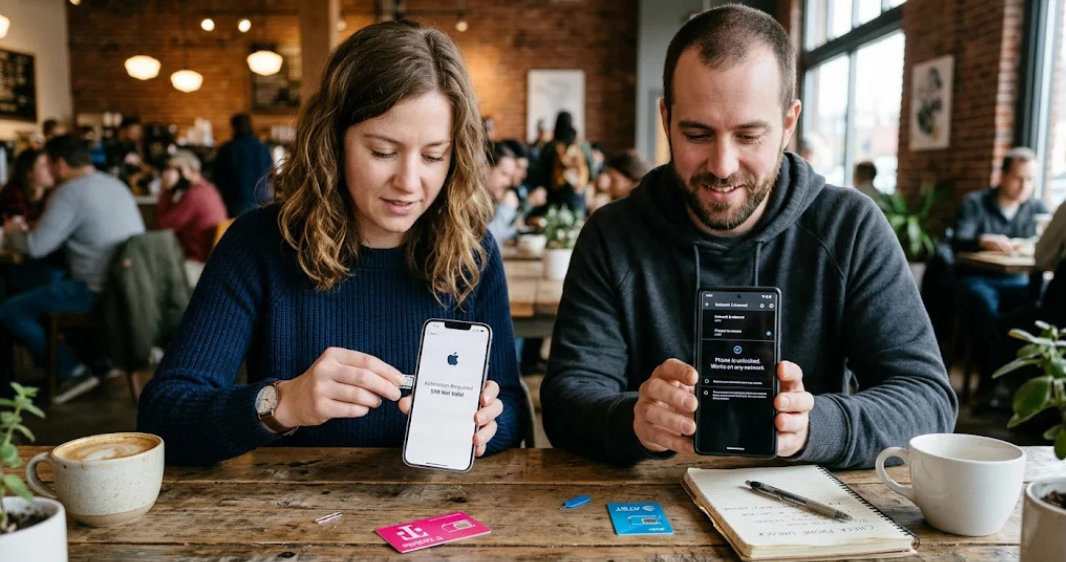
A cross-carrier SIM test works on both major phone platforms. Use an active SIM from a network different from your current provider. Restart the phone after inserting it, then wait for network registration. Try making a call and loading a webpage with cellular data. Successful service is strong evidence that the device is unlocked. An error such as “SIM Not Supported” can indicate a carrier restriction. A failed test does not always prove the phone is locked.
The SIM could be inactive, or the device may lack network compatibility. Confirm questionable results with the original carrier before requesting an unlock. If you need to identify which line is active first, see TechnoLoss’s guide to finding your phone number. It covers physical SIM and eSIM lines on iPhone and Android. That can prevent testing the wrong mobile line.
4. Try Another Carrier’s eSIM
An eSIM can perform a similar test when your device has no physical SIM tray. The phone must support eSIM and the prospective carrier must support your model. A carrier lock can prevent another provider’s profile from activating. Do not assume eSIM support means the phone is unlocked. Those are separate capabilities. A phone can support several eSIM profiles while remaining restricted to one carrier. If activation fails, read the exact error before drawing a conclusion. An unsupported model, inactive plan, or network issue can produce similar symptoms. Your carrier can separate those problems from an actual lock.
5. Ask the Original Carrier
Carrier confirmation is the safest option when device settings do not give a clear answer. Contact the provider that originally sold or locked the phone. Have your account details and IMEI available when requested. You can usually find the IMEI under the phone’s About screen. Dialing *#06# also displays it on many devices. Do not post your IMEI publicly or send it to untrusted websites. The carrier can tell you whether the device is locked and whether it qualifies for unlocking. Eligibility depends on the provider and account circumstances. Current U.S. policies differ considerably between AT&T, T-Mobile, and Verizon.
What You’ll Need Before Checking
You usually need only the phone and access to its Settings app. A second carrier’s active SIM or eSIM can provide stronger confirmation. Carrier account credentials may help if you need an official unlock status. Keep these items ready.
- The phone you want to check.
- Access to Settings.
- Your IMEI, if contacting the carrier.
- An active SIM from another carrier, when available.
- Wi-Fi during an eSIM activation test.
- Your carrier account login, if required.
Avoid paid third-party unlock-status websites unless you trust the provider and understand its privacy practices. Your carrier already maintains the information that determines unlocking eligibility. Checking with the carrier also avoids confusing compatibility results with lock status.
U.S. Carrier Unlock Rules You Should Know in 2026
U.S. carriers do not all use identical unlocking rules. Your phone may therefore remain locked even after you stop actively using it. Check the current provider policy before assuming a paid phone qualifies.
| Carrier | Key current requirement | Important detail |
|---|---|---|
| AT&T | Generally purchased more than 60 days ago and paid off | Account and device must meet additional eligibility rules |
| T-Mobile | Postpaid devices generally need 40 days of network activity | Financed devices must generally be paid in full |
| Verizon | Current policy depends on purchase and payment circumstances | Policies changed for devices purchased from January 27, 2026 |
AT&T currently requires eligible devices to be paid in full. Its main unlock page also states a device generally must have been purchased over 60 days earlier. Lost, stolen, fraudulent, or delinquent situations can affect eligibility. T-Mobile currently requires eligible postpaid devices to have at least 40 days of activity. Financed or leased equipment must also satisfy applicable payment requirements. Eligible remotely unlockable devices can be unlocked automatically.
Verizon changed its device-locking policy for newer purchases during 2026. Current postpaid rules focus heavily on completing payment obligations. Prepaid devices follow separate conditions, so check Verizon’s current policy for your exact account. Carrier policies can change after this article is published. Always verify requirements on your provider’s official website before paying off or transferring a line. This is especially important when selling a financed phone.
Locked vs. Unlocked vs. Compatible
These three terms describe different conditions. Mixing them together can make a working unlocked phone appear defective. Check each condition separately when changing carriers.
| Status | What it means | Can another carrier work? |
|---|---|---|
| Locked | Restricted by the original carrier | Usually no |
| Unlocked | No carrier restriction | Possibly |
| Compatible | Hardware and network requirements match | Yes, if also unlocked |
| IMEI blocked | Device may be reported lost, stolen, or restricted | Often no |
An unlocked phone can still fail a carrier compatibility check. That does not necessarily mean the original carrier relocked it. The model may lack required network support. Likewise, an IMEI block is not the same as a SIM lock. A blocked device may remain unusable even after carrier restrictions are removed. Ask the target carrier to check compatibility before switching.
What to Do If Your Phone Is Locked
Start with the carrier that placed the restriction on the device. Review your remaining device balance and account status. Then submit an official unlock request if the carrier requires one. Do not buy random unlock codes before checking with the provider. Modern carrier unlocking is often handled remotely rather than through a manually entered code.
Unauthorized services may charge for information your carrier provides directly. After an unlock, restart the phone and test the new carrier again. You may also need fresh network settings or carrier provisioning. If texts fail afterward, TechnoLoss’s message blocking troubleshooting guide can help isolate messaging problems.
Why an Unlocked Phone Might Still Show No Service
No service does not automatically mean your device remains carrier locked. Coverage, SIM activation, unsupported network bands, account provisioning, and outages can produce the same symptom. Test basic connectivity before requesting another unlock. Try calls, mobile data, and text messaging separately.
This reveals whether the whole cellular connection has failed or only one service. Restart the phone after activating a new SIM or eSIM. Weak cellular coverage can also make network testing unreliable. If the device starts heating while repeatedly searching for service, see TechnoLoss’s guide to phone overheating. Move to a stronger coverage area before repeating the test.
How to Check a Used Phone Before Buying It
Never rely only on a seller saying the phone is unlocked. Ask them to show the lock-status screen or test your carrier before payment. You should also verify the device has not been reported lost or stolen. For an iPhone, check Carrier Lock in Settings while you are holding the device. For Android, use the manufacturer’s network-unlock screen when available.
A different carrier’s active SIM gives you another useful test. Also confirm that the exact model works with your preferred U.S. carrier. International variants can differ from U.S. models. An unlocked label cannot solve missing hardware support.
The Best Way to Confirm Your Phone Is Unlocked
Use more than one check when the result affects a carrier switch or used-phone purchase. Start with the phone’s settings, then confirm through another carrier or the original provider. That approach separates carrier locks from compatibility and activation problems. For iPhone, the Carrier Lock field is usually the fastest answer. Android users should check model-specific settings and use a second-carrier test when necessary.
Carrier support remains the final source when the device gives conflicting information. Once you confirm the phone is unlocked, check compatibility before moving your number. Keep your existing service active until the new line works properly. That reduces the chance of losing cellular access during the switch.
Frequently Asked Questions
How to tell if phone is unlocked without another SIM?
On iPhone, check Settings > General > About > Carrier Lock. “No SIM restrictions” means Apple considers the device carrier unlocked. Android users may need the manufacturer’s unlock menu or confirmation from the original carrier.
Does “No SIM restrictions” mean my iPhone is unlocked?
Yes, according to Apple’s current support guidance. That message indicates the iPhone has no carrier lock. You should still confirm compatibility with the carrier you plan to use.
Can I check an Android phone without contacting the carrier?
Sometimes, depending on the manufacturer and carrier software. Certain Samsung and Motorola devices provide a visible network-unlock status. Otherwise, another carrier’s SIM or official carrier support gives a clearer answer.
Does an unlocked phone work with any carrier?
No, because unlocking and compatibility are different. The device still needs appropriate radio bands, technologies, and carrier support. Run the new carrier’s compatibility check before transferring your number.
Can Apple, Samsung, or Google unlock my carrier-locked phone?
The original carrier normally controls the carrier restriction. Apple specifically directs locked iPhone users to their carrier for unlocking. Android manufacturers may provide instructions, but carrier requirements still determine eligibility.
Is it safe to give someone my IMEI?
Give it only to trusted parties with a legitimate reason, such as your carrier or a reputable buyer process. Avoid publishing it publicly or entering it into unknown services. The number uniquely identifies your device on cellular systems.